The ClearVu Design Space Python Package
The possibility of solution space optimization was introduced with ClearVu Design Space. The idea is to find a box as big as possible within the design space, where all possible designs in the new box fulfill all given constraints. Thus, this is an optimization task (maximize the volume of the box with the constraint all designs in the box are valid.
Methods
Solution space optimization
First, before diving into solutions spaces, you define the labels “good”/”bad” for designs (sample). A design is evaluated by one or more characteristics (e.g. quality, price, …) where for each characteristics exists a critical value. Thus, a good design fulfills all characteristics requirements where a bad design has one or more characteristics value beyond their critical value.
A solution space is a sub-space of a design space with the property of all designs within the sub-space being good. The optimization task is now to find a solutions space which is a big as possible. To check whether a sub-space is a valid solution space, a certain number of designs is evaluated in the sub-space.
Getting started
Solution space optimization
First, you need to instantiate a manager to connect to the ClearVu Design Space core.
1from cvds import CvdsBase as Base
2
3manager = Base.Manager()
The manager object can be used to create or import solution space optimizations. To create an optimization use
1space_opt = manager.create_solution_space_optimizer()
In order to define a solution space optimization task, you need to define the input space and the outputs (deciders for good/bad designs). The input space is defined by a set of input variables either real-valued or class variables. Additionally, you need to define the range for each variable (lower/upper bound for real-valued variables, a set of class labels for class variables).
Defining the input space
For this example you add two real-valued variables with a lower bound of -4.0 and an upper bound of 4.0 and a class variable with three classes.
1space_opt.add_input('x1', -4., 4.)
2space_opt.add_input('x2', -4., 4.)
3space_opt.add_input('x_class', labels = ['green', 'yellow', 'red'])
Setting the output variables
Next, you define one output variable with a critical upper value of 500 meaning any design with a value higher than 500 is considered bad.
1space_opt.add_output('y', upper_crit=500)
Implementing an evaluation function and setting it
Similar to standard optimization described above, you need an evaluation function which calculates the output values for a set of designs. Therefore, you need to implement a function accepting a data frame and returning a data frame with output variable values. Each iteration, the candidate solution spaces are evaluated by creating a set of samples for each candidate and these are sent to the evaluation function to obtain the output values. The data frame containing the samples has a column for each input variable. The function needs to return a data frame containing a column for each output variable and the same number of rows as the input data frame. The names of the output variable columns must match the names set in the optimization. The names of all output variables need to be unique.
In this example you use a modified Rosenbrock function.
 1from cvds import Examples
 2import pandas
 3
 4def evaluation_function(df):
 5        y = []
 6        for row in range(len(df)):
 7                y_rosenbrock = Examples.function_rosenbrock(df.iloc[row,0:2])
 8                if df.iloc[row, 2 ] == 'yellow':
 9                        y_rosenbrock *= y_rosenbrock
10                if df.iloc[row, 2 ] == 'red':
11                        y_rosenbrock *= y_rosenbrock
12                y += [y_rosenbrock]
13        return pandas.DataFrame(data={'y': y})
An evaluation function is connected to an optimization with:
1space_opt.set_evaluation_function(evaluation_function)
Final solution space quality
The aim of a solution space optimization is to maximize a box where all designs are good designs. To avoid that an edge is preffered over others because of a different scale about measure for the quality of a solution space should be based on normalized edges. A straight forward measure would be the volume of the solution space. But, this measure can encounter numerical issues with high input dimensions. An alternative can be the sum of the edges which is measure selected by default.
To add flexibility, the box evaluation function can be changed with:
1space_opt.set_box_evaluation_function(box_evaluation_function)
A box evaluation function takes as box (dictionary of name -> [min, max] or name -> [class_name_1, class_name_2, …]) and returns the quality as a scalar value (higher -> better). There are some predifined functions available:
cvds.Optimizations.SolutionSpaceOptimization.box_norm_volume()
1def box_norm_volume(self, box):
2        widths = [interval[1]-interval[0] for variable_name, interval in box.items()]
3        return numpy.prod(widths)
cvds.Optimizations.SolutionSpaceOptimization.box_norm_diagonal()
1def box_norm_diagonal(self, box):
2        widths = [interval[1]-interval[0] for variable_name, interval in box.items()]
3        return numpy.sqrt(numpy.sum(numpy.square(widths)))
cvds.Optimizations.SolutionSpaceOptimization.box_norm_edge_sum()
1def box_norm_edge_sum(self, box):
2        widths = [interval[1]-interval[0] for variable_name, interval in box.items()]
3        return numpy.sum(widths)
cvds.Optimizations.SolutionSpaceOptimization.box_norm_weighted_edge_sum()
1def box_norm_weighted_edge_sum(self, box):
2        widths = [interval[1]-interval[0] for variable_name, interval in box.items()]
3        widths.sort()
4        return numpy.sum(numpy.multiply(widths, [i for i in range(len(widths), 0, -1)]))
For example, you can change from edge sum to diagonal with:
1space_opt.set_box_evaluation_function(space_opt.box_norm_diagonal)
Changing optimization parameters
Parameters of the optimization can be changed with the cvds.Optimizations.SolutionSpaceOptimization.set_parameter() function.
The most important parameter you may want to change are the number of generations, that will be generated, and
the two size parameters ‘Mue’ and ‘Lambda’. ‘Mue’ is the size of the parent population, and ‘Lambda’
is the size of the offspring population. Please keep in mind, that the parameter values in this example
have been tuned for a very simple objective function and may be not sufficient for our task. The parameter ‘TestSampleCount’
sets the number of samples for each candidate box used to evaluate a candidate. Thus, in total lambda * max_generations * test_sample_count
sample designs will be evaluated during an optimization.
1space_opt.set_parameter('Mue', 5)
2space_opt.set_parameter('Lambda', 10)
3space_opt.set_parameter('MaxGeneration', 100)
4space_opt.set_parameter('TestSampleCount', 100)
Constraining the search space for real-valued input variables
Usually, if looking at one variable (edge), the solution space optimizer tries to find an edge which is inside the design interval.
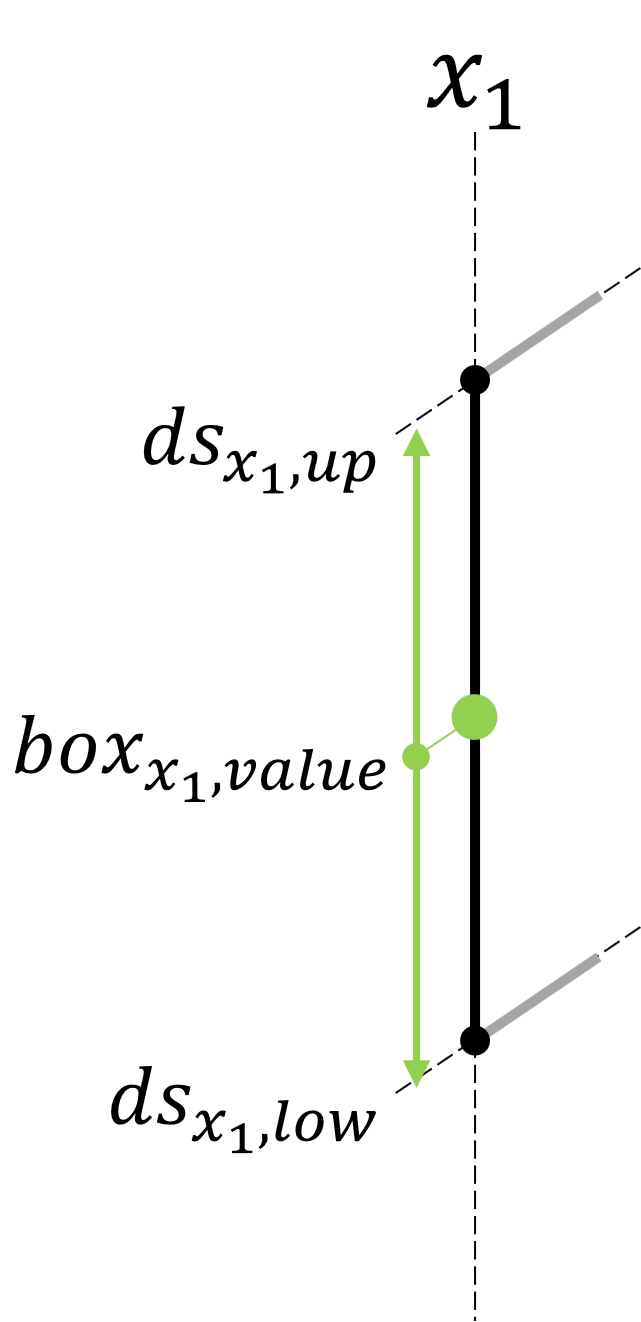
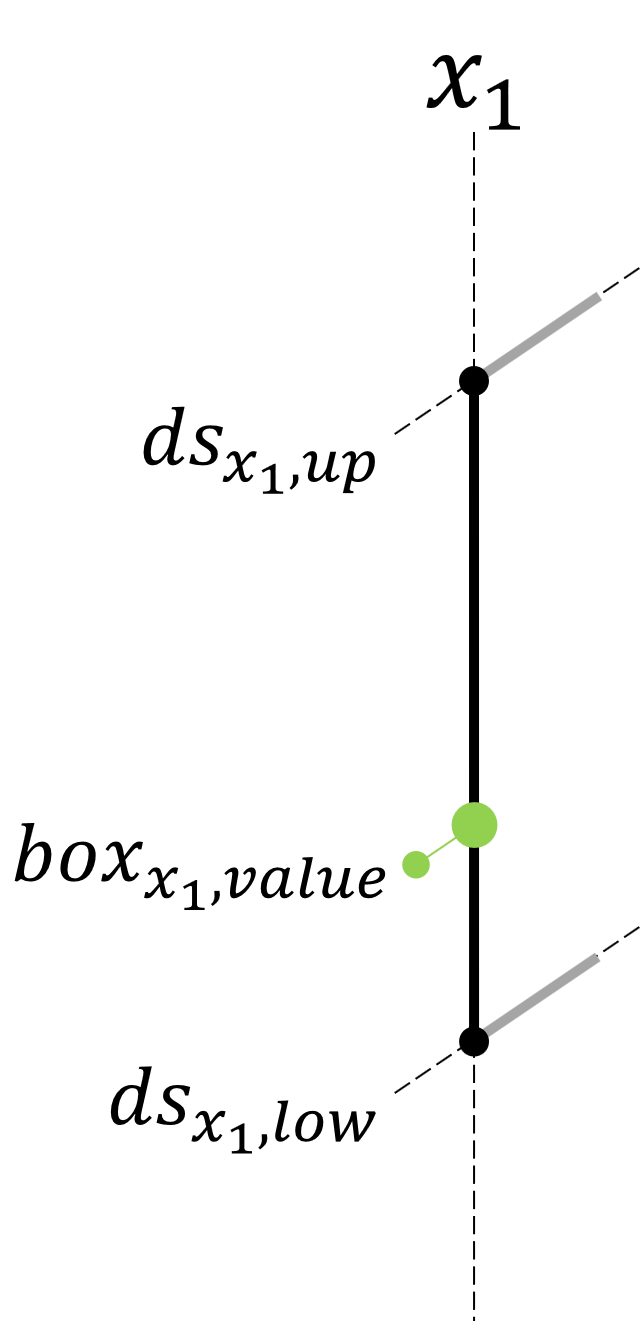
For a variable \(x_1\) the design interval is given by the lower bound \(ds_{x_{1},low}\) and the upper bound \(ds_{x_{1},up}\).
You can change the design interval with cvds.Optimizations.SolutionSpaceOptimization.set_input_lower_bound() and cvds.Optimizations.SolutionSpaceOptimization.set_input_upper_bound().
One of the bounds can be fixed with either cvds.Optimizations.SolutionSpaceOptimization.set_input_is_lower_fixed() or cvds.Optimizations.SolutionSpaceOptimization.set_input_is_upper_fixed().
If both are fixed, the input variable is not used in the optimization. The interval is still used as the sampling interval for this input variable.
Default setting for an input variable |
Fix the lower bound of an input variable |
|---|---|
|
|
|
|
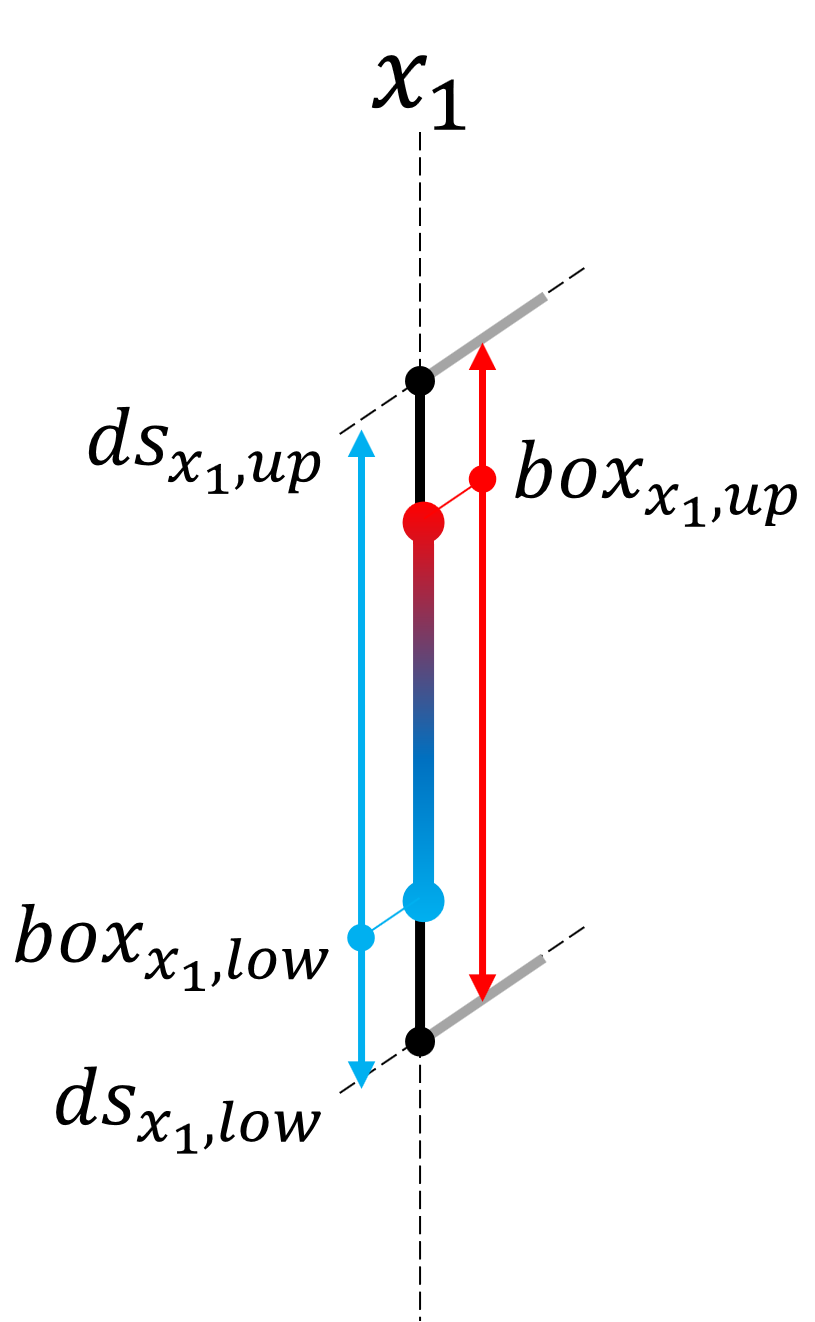
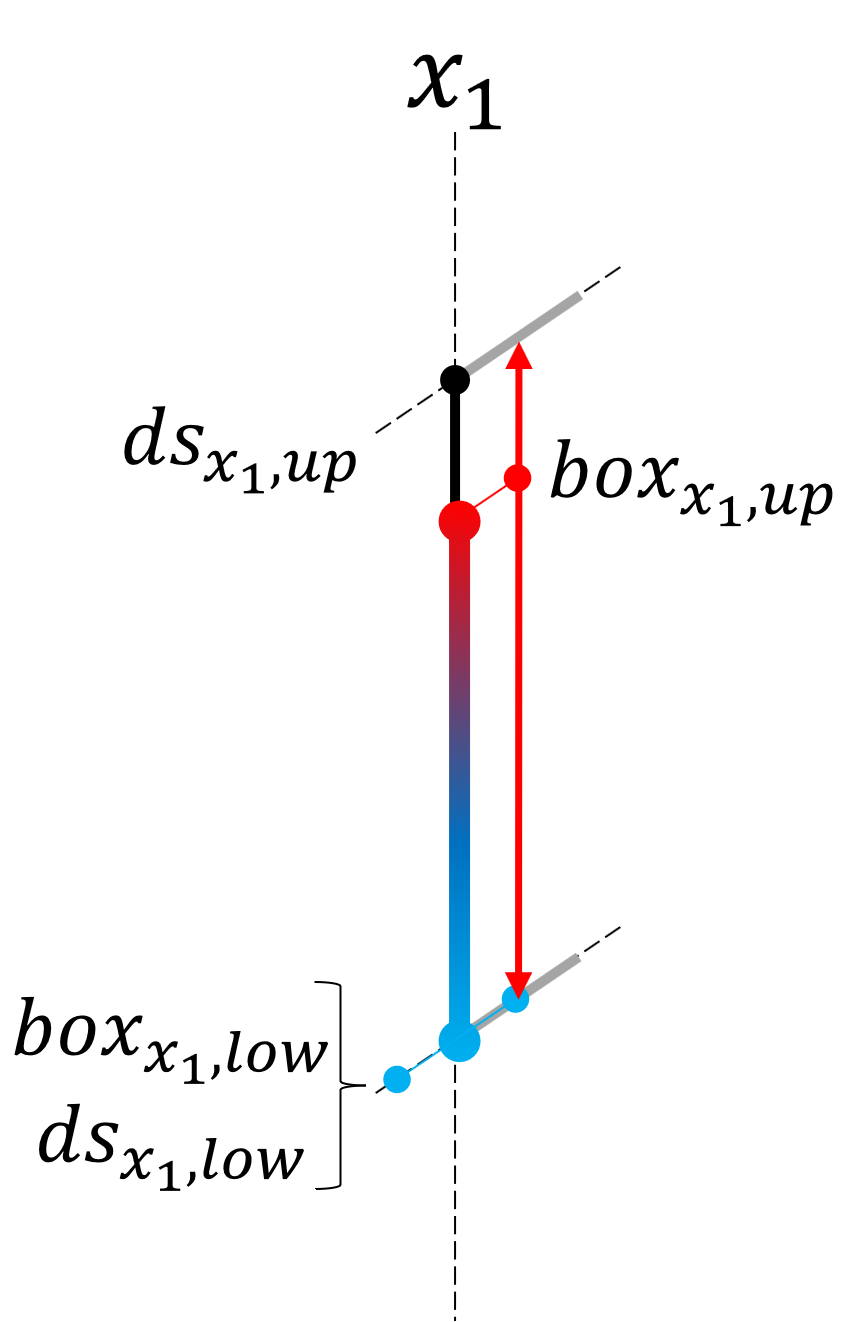
For the default both \(box_{x_{1},low}\) and \(box_{x_{1},up}\) of the final solution space box can be anywhere in the design interval except that \(box_{x_{1},up}\)> \(box_{x_{1},low}\). This default setting can be altered for each variable indivdually in order to constrain the solution, like fixing one bound.
There are two additonal options to constrain an input variable. The width of the final interval can be fixed with cvds.Optimizations.SolutionSpaceOptimization.set_input_is_width_fixed() and
cvds.Optimizations.SolutionSpaceOptimization.set_input_width(). The other option is to set additonal bounds for the lower and upper bound (cvds.Optimizations.SolutionSpaceOptimization.set_input_lower_upper_bound()
and cvds.Optimizations.SolutionSpaceOptimization.set_input_upper_lower_bound()). In the example below the lower bound is constraint by a seperate upper bound which differs from the design interval upper bound.
Fix the width of an input interval |
Additionally constrain the lower bound |
|---|---|
|
|
|
|
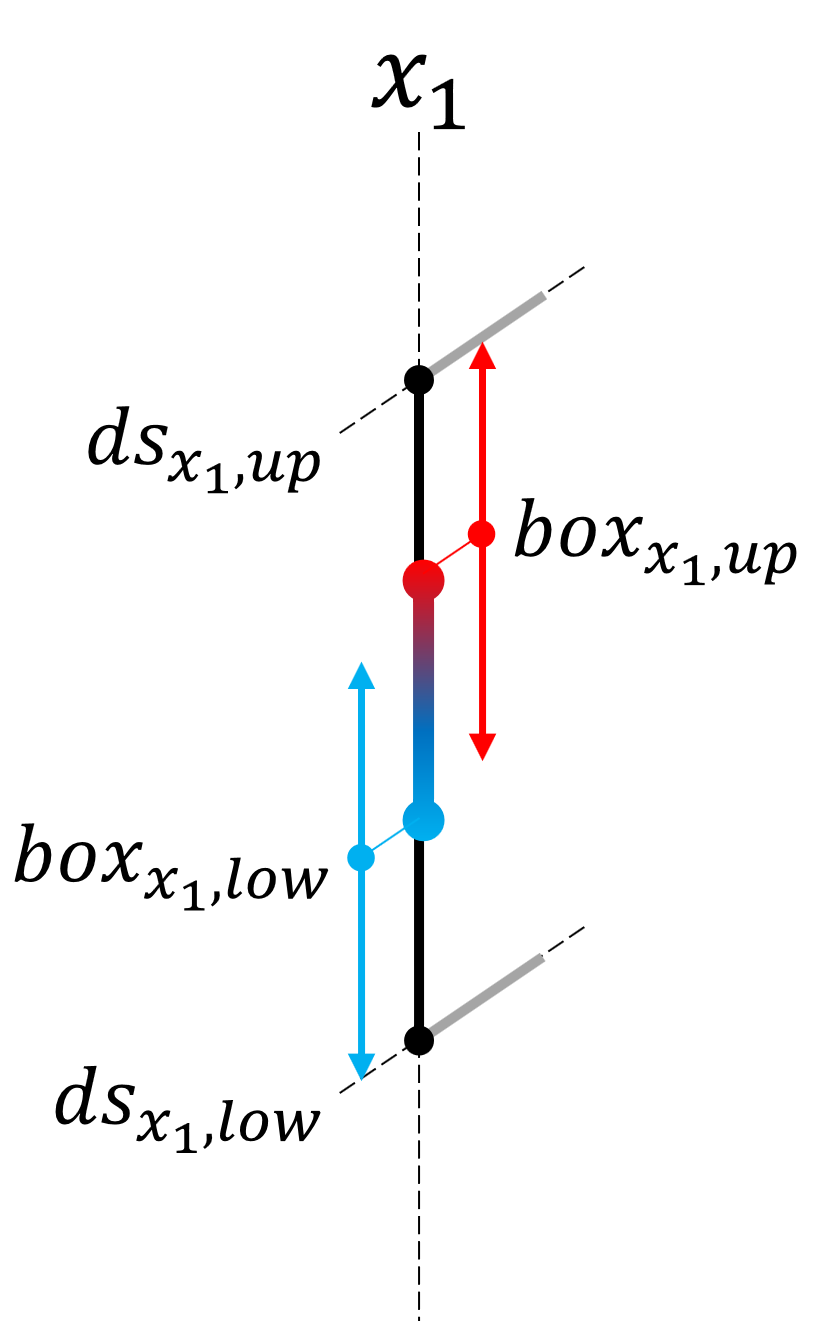
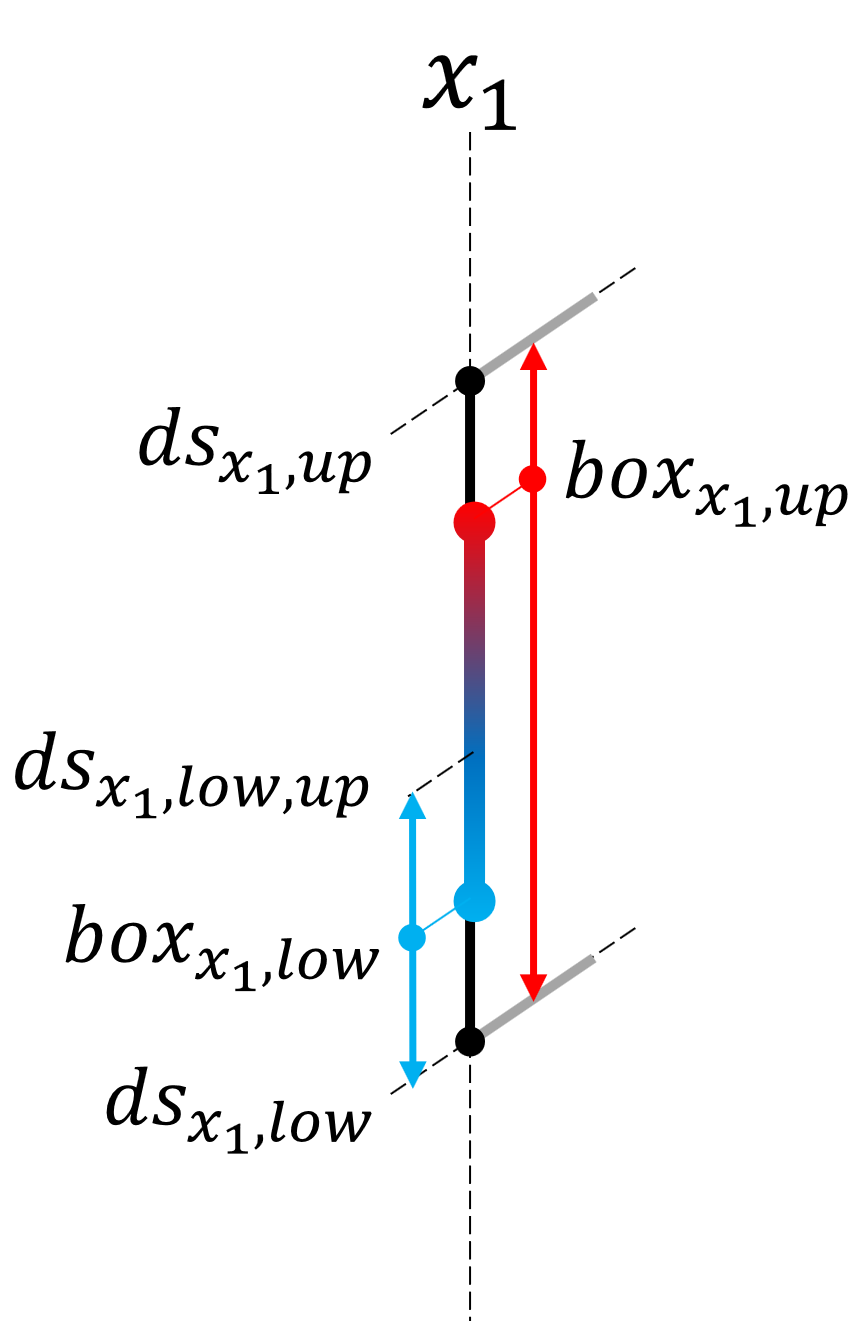
If a variable should have a certain value instead of allowing an interval you can use cvds.Optimizations.SolutionSpaceOptimization.set_input_is_interval() and
set interval to False. In addition the value can be fixed (cvds.Optimizations.SolutionSpaceOptimization.set_input_is_value_fixed() and cvds.Optimizations.SolutionSpaceOptimization.set_input_value()),
thus this variable is not used in the optimization.
Single value instead of an interval |
Fixed value for an input variable |
|---|---|
|
|
|
|
Constraining the search space for class input variables
By default, the result of an edge represented by class variable is a subset of the labels defined in the design space. You can fix the edge to the defined classes with
cvds.Optimizations.SolutionSpaceOptimization.set_input_is_class_names_fixed(). If only one class label should be selected as an edge, cvds.Optimizations.SolutionSpaceOptimization.set_input_is_interval()
must be set to False. If in addition the single label edge is also fixed use cvds.Optimizations.SolutionSpaceOptimization.set_input_is_value_fixed() and set the fixed label with
cvds.Optimizations.SolutionSpaceOptimization.set_input_value().
Starting the optimization
After finishing the setup of the solution space optimization it can be started with:
1results, qualities = space_opt.optimize()
When the optimization finishes successfully, the optimal solution spaces and their qualities are returned.
The following chart shows how the solution space optimizer works:
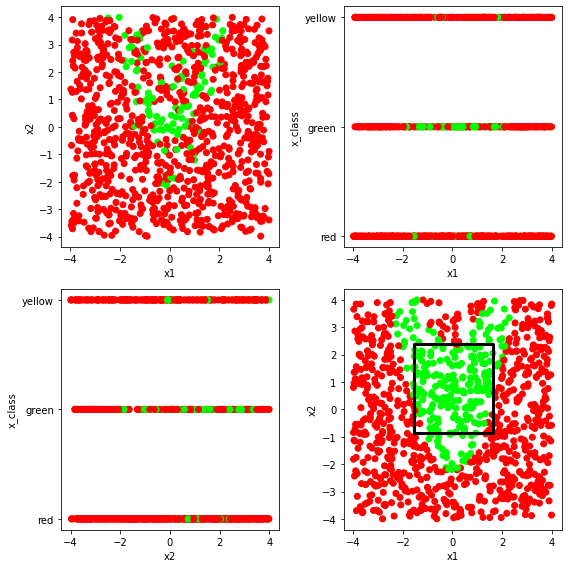
If you create random samples in the design space and assign the colors green=good / red=bad and plot them like in the upper left chart, you see the difficulty to define a box which gives only good samples, as the result also depends on the x_class. After the optimization you get a plot like the one in the lower right corner if you sample the dependent variables (in this case x_class) within the bounds of the optimal solution space.
More options to control the optimization
It is possible to further restrict the optimization in the design space. This includes fixing bounds of input variables, using single value instead of an interval/class set to setting a fixed width for real-valued input variables. Also, you can provide initial boxes instead of letting the optimizer generate random start boxes.
Managing solution space optimizations
You can use pickle to save the optimization. To reload from a pickle you can either use the function
cvds.Base.Manager.load_solution_space_optimizer() or use unpickle and then connect the model with the manager via
cvds.Optimizations.SolutionSpaceOptimization.connect().